
One to many.
Send one source account to several MT5 receivers. Each receiver keeps its own volume and symbol rules.
Copy trades across your MT5 accounts. Connect local terminals and configure each receiver from one familiar on-chart dashboard.
MT5 desktop · Same Windows computer or VPS · No separate connector or DLL
Send. Receive. Stay in control.By Issam Algo
12 illustrated workflows with genuine Cynex dashboard captures. Volumes are examples; broker specifications and execution rules apply.
Send one source account to several MT5 receivers. Each receiver keeps its own volume and symbol rules.
Follow several named sources in one receiver. Use shared settings or a profile for each source.
Send and receive from the same terminal. Copied trades are excluded from outgoing updates to prevent copy loops.
Follow the setup, connection patterns, receiver controls and first demo test.
Overview, Connections, Copy settings, Trades, Activity and Help keep the work in one place.
Use MT5 desktop under the same Windows user on one computer or Windows VPS. Attach one Cynex instance per participating account.
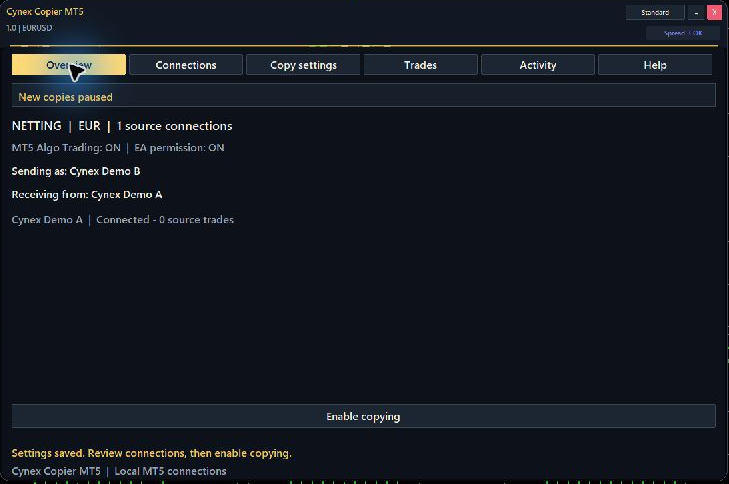
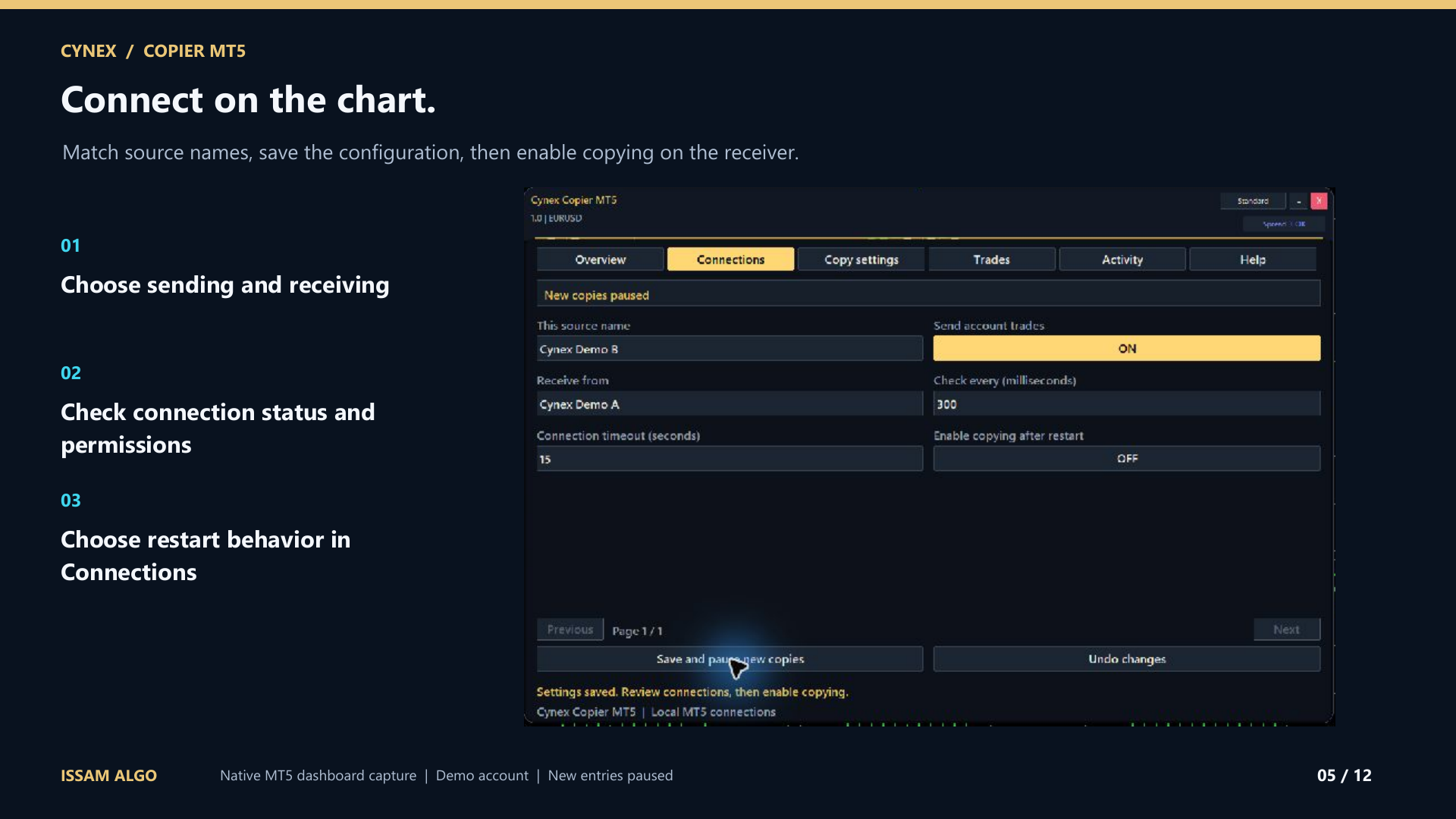
In Connections, turn on sending and give every source a unique name. Enter those names in the receiver’s Receive from field, separated by semicolons.
Choose shared defaults or a source profile. Review lot sizing, account currencies, symbol aliases and broker contract sizes.
Select Save. Confirm that Overview reports the intended sources as Connected. Enable Algo Trading for terminals that will receive trades.
Enable copying, then check opening, stop changes, partial closing and full closing. Verify the actual receiver fills and Activity messages before using a live account.
Open the PDF guide and watch the online course here. After purchase, message Issam on MQL5 for channel access, setup assistance and your Smart Universal Expert Advisor gift.
After purchasing, follow the welcome page and message Issam privately on MQL5 with your purchase details, broker name and trading account number. Never send a password. The separate gift is optional, and no review is required.
This edition connects MT5 terminals on the same Windows computer or Windows VPS, under the same Windows user and Common Files location. It does not provide internet copying between separate computers, MT4 copying or connections between separate MetaQuotes virtual-hosting instances.
Choose Same lots, Fixed lots, Multiplier, Balance ratio, Equity ratio, Stop loss risk or Lots per capital. Account currencies, broker minimums, volume steps and contract sizes affect the final order. Review these on each receiver.
Yes. On netting accounts, source contributions share a broker position. Per-contribution stops, targets, break-even and trailing are virtual, so the EA, terminal and broker connection must stay running.
An absent, stale or incomplete source update retains existing copied trades. Check Overview and Activity, restore the source and let Cynex reconcile its saved trade identities. Disconnection is not treated as an instruction to close the account.
The 18-page PDF guide covers installation, the connection patterns, all 68 dashboard settings, trade management, troubleshooting and a demo acceptance sequence. Watch the first lesson here and message Issam on MQL5 for personal assistance.
Educational content access. Trading software, signals, coaching and subscriptions are separate.
Standalone collections total $29.98. The bundle intentionally costs less than courses alone. See exactly what is included and access availability.