Explore possible Elliott wave structures, inspect alternative counts and review hypothetical price references. A read-only status panel keeps the selected pattern and your settings in view.
Standard time-based candles · Controls in indicator Settings · No order execution
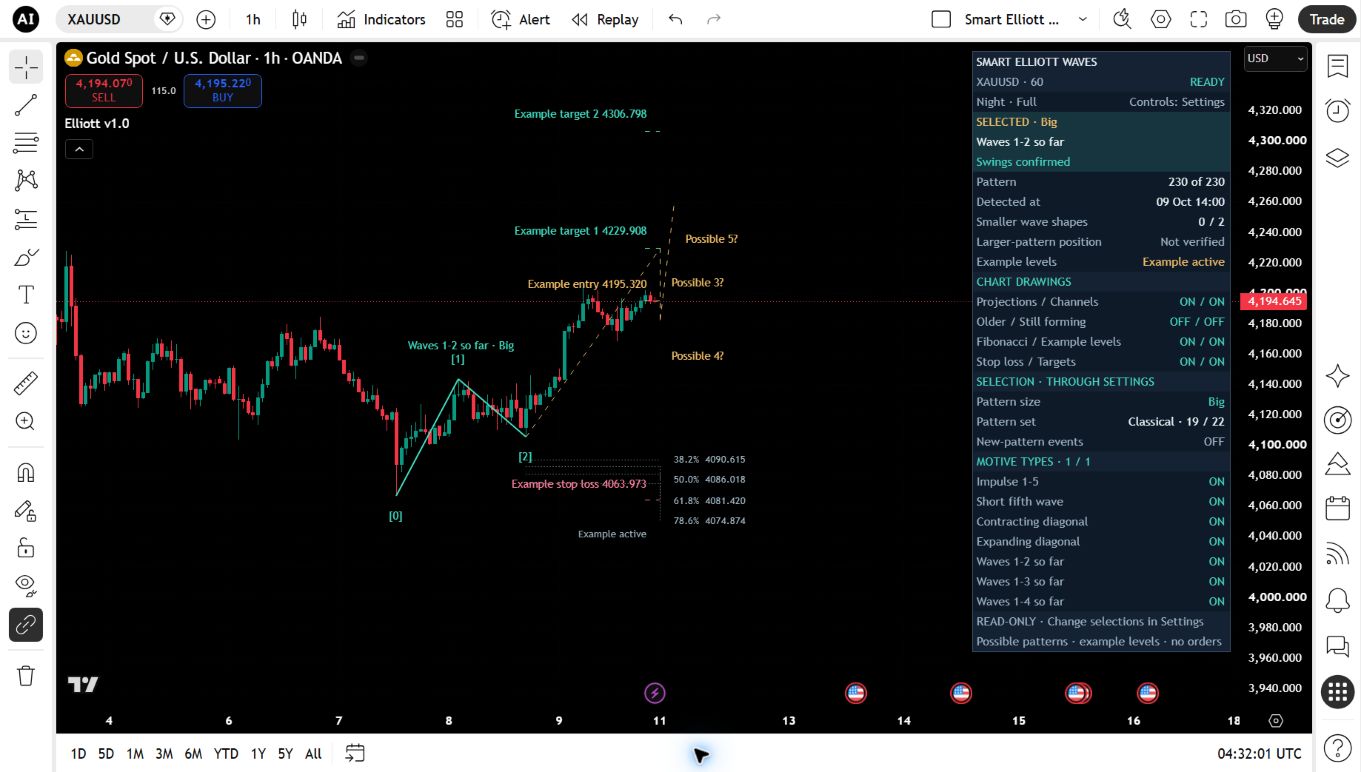
Smart Elliott Waves on TradingView · Smart Elliott Waves on Gold, one-hour candles, with confirmed swing geometry, optional price references and a read-only status panel. OANDA XAUUSD, 1 hour, Night / Full, Classical / Big. Same active hypothetical example; not a completed winner. These review settings are not the shipped defaults.
A TRADINGVIEW WORKFLOW
Choose in Settings. Read on the chart.
Choose the interpretation.
Classical enables 19 pattern types. Core narrows the selection; All adds three experimental types. Custom gives each type its own switch. Small, Medium, Big and All filter relative swing size.
Browse and compare.
Pattern number 0 follows the newest matching interpretation; 1 is oldest. Alternatives may share an endpoint. Use TradingView’s own pan and zoom to frame the count.
Keep useful layers.
Switch possible future waves, channels, Fibonacci references and hypothetical example levels independently. Optional older structures are muted and do not overlap the main selection.
The panel shows status; Settings change it. Full, Standard, Compact and Collapsed layouts, corner positioning and text sizing are selected in indicator Settings. The panel has no clickable buttons or drag handles.
ACTUAL TRADINGVIEW INTERFACE
Keep the useful layers.
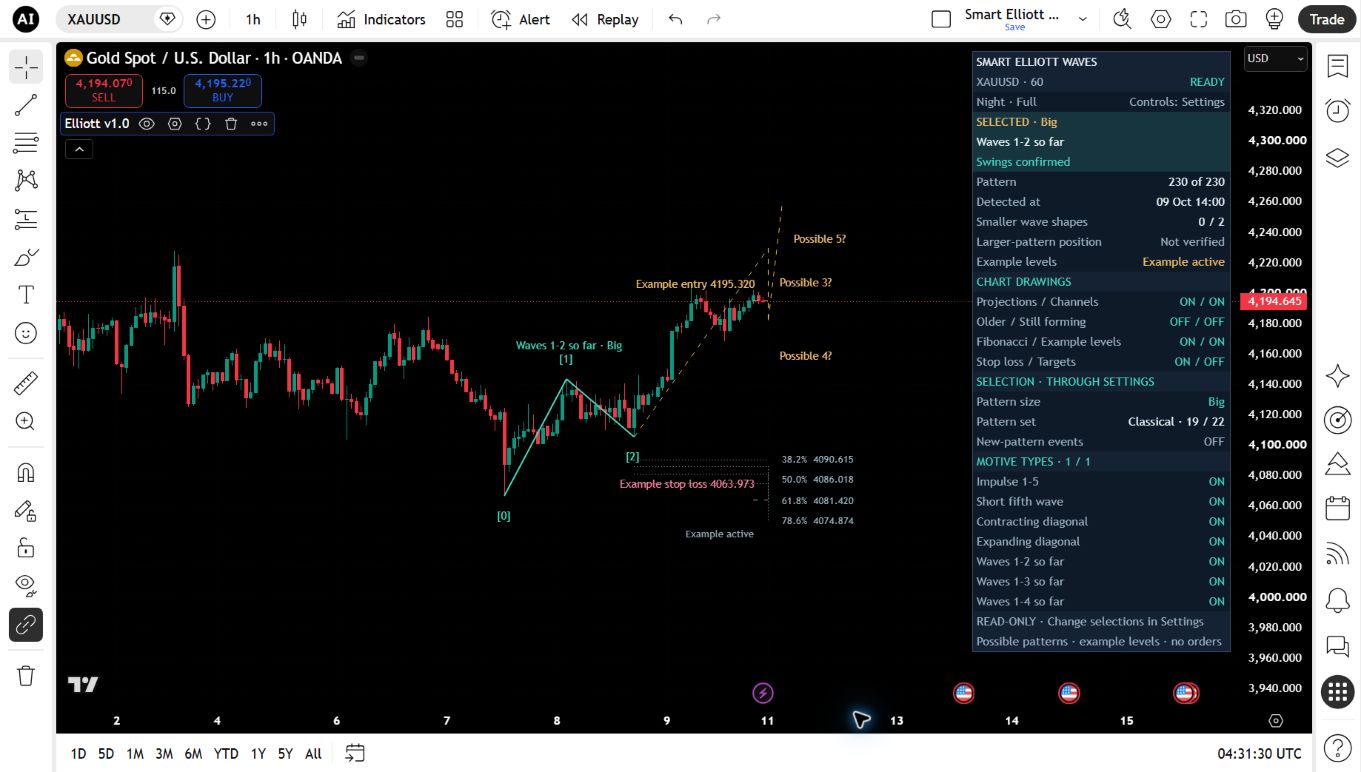
These two views show the same active hypothetical example. The second hides targets through Settings; it is not another trade or a completed result.
Smart Elliott Waves on TradingView · Smart Elliott Waves on Gold, one-hour candles, with confirmed swing geometry, optional price references and a read-only status panel. OANDA XAUUSD, 1 hour, Night / Full, Classical / Big. Same active hypothetical example; not a completed winner. These review settings are not the shipped defaults.Choose the layers in Settings · The same Gold example with targets hidden in Settings; wave geometry, stop reference and status remain visible. OANDA XAUUSD, 1 hour, Night / Full, Classical / Big. Same active hypothetical example; not a completed winner. These review settings are not the shipped defaults.
PATTERN COVERAGE
Families, partial sequences and alternative counts.
7 SELECTABLE TYPES
Motive
Full and partial motive structures.
Impulse 1–5
Short fifth wave
Contracting diagonal
Expanding diagonal
Waves 1–2 so far
Waves 1–3 so far
Waves 1–4 so far
12 SELECTABLE TYPES
Corrective
Simple corrections, triangles and combinations.
Zigzag ABC
Regular flat ABC
Expanded flat ABC
Running flat ABC
Contracting triangle
Barrier triangle
Expanding triangle
Running triangle
Double zigzag WXY
Triple zigzag WXYXZ
Double three WXY
Triple three WXYXZ
3 SELECTABLE TYPES
Modern
Experimental shapes; off in the default Classical pattern set.
Neutral
Diametric
Symmetrical
Classical starts with the 19 Motive and Corrective types. The three Modern types are experimental geometry and duration tests, not comprehensive modern-wave theory.
GETTING STARTED
Build a clear chart view.
Use standard time-based candles. Feed history, tick size and swing settings affect the available interpretations. Choose a dark or light host-chart background to suit the indicator’s Night or Day palette.
Open indicator Settings. Select a pattern set, relative size and pattern number. The status panel reflects those choices. A change does not automatically pan or fit the chart.
Read confirmed and forming states. Later evidence seals earlier swing points. The last unsealed swing can still move or disappear. A partial sequence remains incomplete even when its observed points are confirmed.
Review example levels carefully. Some structures show an entry, stop and two targets frozen when detected. These are hypothetical references, not orders or broker fills. A candle touching stop and target can have unknown touch order.
Enable alerts deliberately. Events start off. When access is activated, enable the desired events and create a TradingView alert using “Any alert() function call.” Recreate alerts after changing their settings.
PART OF THE ISSAM ALGO SUITE
One suite. No separate Elliott charge.
Smart Elliott Waves is included in the Issam Algo Suite at US$27.99 per month, with no separate Elliott charge. It is available now as one of the seven invite-only suite indicators. Access is activated manually after payment verification.
Already subscribed? Send your exact TradingView username and checkout email to support to activate Smart Elliott Waves. No second subscription is needed. After activation, open Indicators → Invite-only scripts on TradingView.
US$27.99/monthExisting suite price No separate Elliott chargeAvailable now · manual activation after verification. TradingView plans and market data are separate.
What remains uncertain?
Wave interpretations do not guarantee future direction. Drawings connect earlier pivots only after detection evidence arrives. Possible forward paths are not price or arrival-time forecasts. Smaller-wave evidence is bounded; larger-pattern placement is not verified.
How do I use the panel and chart?
Use Settings to control the read-only panel. Position uses four corner anchors, and chart pan/zoom remains manual. A paused calculation needs fewer candles, a shorter pattern span or less swing density. The panel’s READY state is not a connectivity or quote-freshness check.