
Latest version
V10.3MT5 · Customer gift edition
Download V10.3Your real trading account must be activated for the gift edition. Need help?
Smart Universal Expert Advisor. Built with your feedback. Shared with you, with my thanks.
MT5 · Customer gift edition
Download V10.3Your real trading account must be activated for the gift edition. Need help?
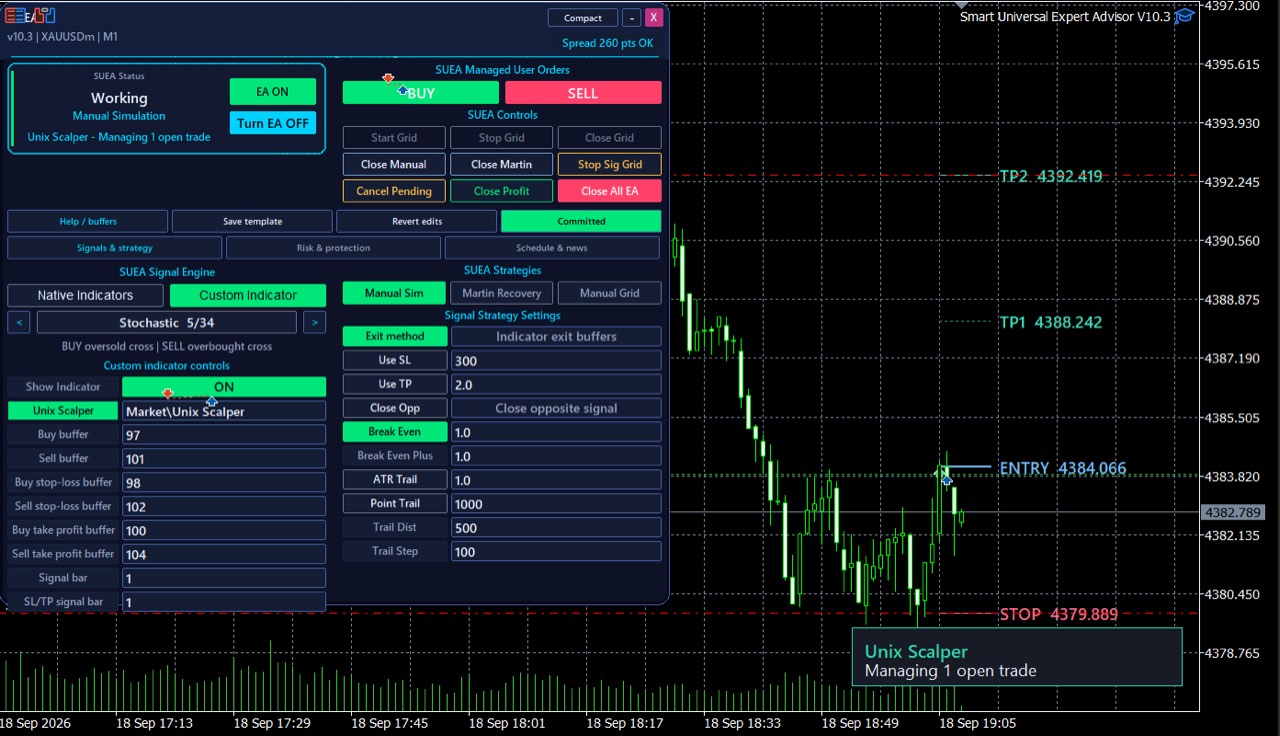 SUEA V10.3 · actual MT5 chart and panel supplied by Issam. Full size
V10.2 · Previous customer gift release.
Download V10.2Start with the master course: install SUEA, configure risk and indicator connections, then validate your setup in Strategy Tester. Keep scrolling for 26 additional tutorials and walkthroughs.
Understand how indicator signals, execution rules and trade management work together, and why the complete setup needs testing.
Match the settings to your installed EA and indicator versions. Test the complete configuration on a demo account before live use.
Go deeper with complete walkthroughs, strategy lessons and automation guides. Choose a topic, browse the covers, then click Watch video to play it here.
Earlier recordings may show older interfaces, settings or offers. Start with the master course above for current guidance.
26 videos · Scroll or use the arrows
 3:41Setup & walkthroughs · Smart Universal Expert Advisor Course 1: Install & Set Up MT5▶ Watch video
 19:40Setup & walkthroughs · Smart Universal Expert Advisor for MT5: Connect Indicators & Automate▶ Watch video
 12:12Setup & walkthroughs · Smart Universal Expert Advisor V9 Tutorial▶ Watch video
 41:42Setup & walkthroughs · SUEA General Presentation▶ Watch video
 3:20Setup & walkthroughs · 1. The Main Idea of the Smart Universal Expert Adviser▶ Watch video
 4:38Setup & walkthroughs · 2. How does the Smart Universal Expert Adviser Works Technically▶ Watch video
 10:47Setup & walkthroughs · 6. Why The SUEA is SMART and UNIVERSAL▶ Watch video
 6:48Strategies & risk settings · Smart Universal Expert Advisor Course 2: Strategies & Risk Settings▶ Watch video
 7:25Strategies & risk settings · STTS Course 18: SUEA Risk Settings, Exits & Validation | Smart Trend Trading System▶ Watch video
 13:16Strategies & risk settings · 4. Understand the Smart Universal Expert Adviser Inputs and Settings▶ Watch video
 6:57Strategies & risk settings · Smart Universal Expert Adviser Settings inputs continued.▶ Watch video
 8:34Strategies & risk settings · 3. Understand Smart Universal Expert Aviser Strategies▶ Watch video
 7:42Indicator connections · Smart Universal Expert Advisor Course 3: Connect Custom Indicators▶ Watch video
 13:52Indicator connections · Connect Smart Trend & Atomic Analyst to Smart Universal EA | MT5 Tutorial▶ Watch video
 6:32Indicator connections · STTS Course 17: Connect STTS to SUEA: V14 Signal Buffers | Smart Trend Trading System▶ Watch video
 13:05Indicator connections · Smart Universal Expert Advisor Course 4: Smart Trend Setup, Stops & Risk▶ Watch video
 7:20Indicator connections · Smart Universal Expert Advisor Course 5: Atomic Analyst & Unix Scalper▶ Watch video
 14:15Indicator connections · Unix Scalper V3 and SUEA V10▶ Watch video
 13:55Indicator connections · How to Connect the Atomic Analyst To the Smart Universal EA▶ Watch video
 53:37Indicator connections · Connect Smart trend to smart universal expert advisor▶ Watch video
 17:53Indicator connections · 9. Connect the Smart Trend Trading System into the Smart Universal Expert Adviser▶ Watch video
 11:08Indicator connections · 10. How to Connect the Atomic Analyst To the Smart Universal Expert Adviser▶ Watch video
 24:08Indicator connections · Part 5: Turn The Smart Trend into Expert Adviser▶ Watch video
 11:16Indicator connections · 7. How to Add a Custom Indicator into the Smart Universal Expert Adviser▶ Watch video
 4:38Indicator connections · 8. Introduction to The Pro Smart Trading System Automation▶ Watch video
 5:49Testing & validation · 5 . How to Demo Test the Smart Universal Expert Adviser▶ Watch video
No videos match. Try another title or choose All tutorials.
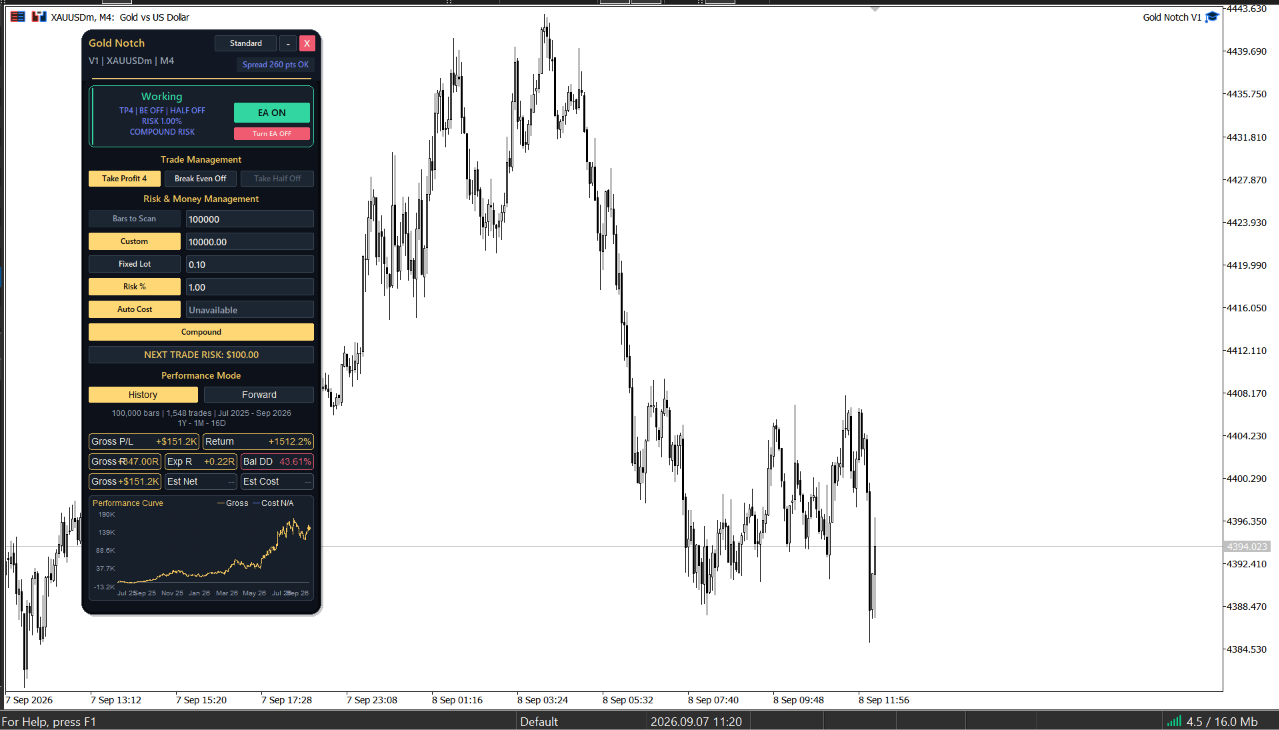 Gold Notch 1.00 · historical gross OHLC simulation; costs unavailable. Full size
Explore Gold Notch: automated entries, defined stop loss and take profit, with presets to test for yourself.
Explore Gold Notch →Find the tools that fit your way of trading.
Explore all products →Connect with fellow traders. Stay close to every update.
Send me a message and I’ll help you get set up.
— Issam